AI for construction: estimating, tenders and project knowledge
AI saves a construction or installation firm time on reading tender documents and drawings, preparing estimates and reusing project knowledge. Price and risk stay human work, while the AI counts, sorts and records every line so it can be checked.
Every tender starts with days of counting and reading. AI can take that work over, as long as the estimator can check every line.
AI pays off in construction in three places: reading tender documents and drawings, preparing estimates and reusing project knowledge. A model that counts penetrations in an IFC file, an assistant that assesses a quote request against earlier projects, a report that grows out of notes and photos. What the AI does not do is set the price or judge the risk; that stays with the estimator and the project manager. Crux Digits builds this as custom software at a fixed price, alongside your ICT partner, with the code and the test set owned by your company.
Three fixed facts
What is settled before the AI starts
- 1 Jan 2024Wkb in forceA dossier for the competent authority and a consumer dossier at every completion notice in consequence class 1.
- 30 / 60 minFire resistance of penetrationsThe E and I criteria of NEN 6069 that must be recorded per penetration, tested to EN 1366-3.
- 4 to 6 weeksProduction-ready MVP, fixed priceMeasured on a test set from your own tenders: hours per tender before and after.
Sources: IPLO, Wet kwaliteitsborging; Brandveilig.com on NEN 6069; our pricing.
From tender to dossier
What the AI does, step by step
Five moments in a construction project where counting, reading and recording cost time, and what changes when a model prepares them.

Reading the documents
Specification, clarification notes and drawings are read into your own checklist of requirements and items.
The IFC model
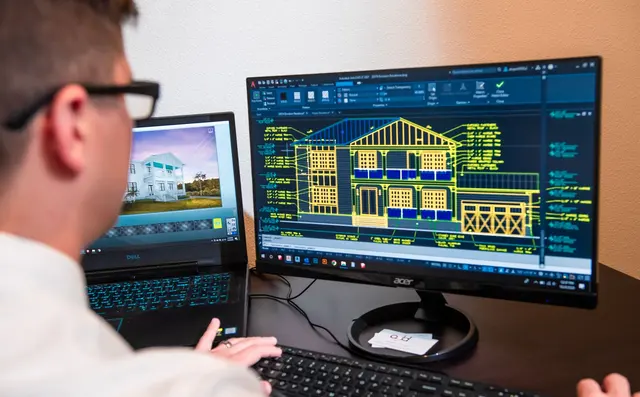
Every element has a type, a size and a GUID. Your counting rules decide what counts as a penetration or an item.
The estimator checks
The AI counts and classifies, the estimator sees the source per line and corrects at fixed checkpoints.

Recording during the work
Photos, notes and location become a report in your own template, approved by the project manager.

The Wkb dossier as a by-product
A count with a reference, a photo with time and place, a report with its source: the dossier documents arise on the way.
AI in construction: six tasks where the difference sits
| Task | What the AI does | What people keep |
|---|---|---|
| Reading tender documents | Extracts requirements, items and deviations from the specification (STABU, NL-SfB or RAW), the clarification notes and the drawings, into your own checklist. | Decides whether to bid and at what risk. |
| Counting quantities | Counts elements in an IFC model or recognises symbols on PDF installation drawings, with a reference per line (GUID or drawing page). | Checks at fixed checkpoints and corrects the counting rules. |
| Preparing the estimate | Links counted quantities to your own unit rates and price list and writes the result in your estimating format. | Sets the price, the margins and the provisional sums. |
| Reusing project knowledge | Answers questions about earlier projects, emails and reports, and drafts a report from notes and photos. | Approves the draft and signs. |
| Work preparation | Lines up planning, materials and points of attention from comparable projects for the site manager. | Plans and runs the crew. |
| Service and work orders | Fills the work order from the conversation with the technician, with materials and hours, ready for the back office. | Approves the order before invoicing. |
Quantity takeoff from IFC and PDF: what works and what does not yet
Quantities are most reliable from an IFC model: every element has a type, a size and a GUID, so a count is traceable and repeatable. The difficulty is practice: every client models differently, architecture and services come from separate models, and a penetration is only a penetration if the element really crosses a fire-rated separation. That takes logic that follows your own counting rules, not a general-purpose model.
PDF drawings are harder. Symbol recognition on installation drawings (sockets, luminaires, penetrations) now works well enough to save time, but scanned sets, phone photos and incomplete drawings produce errors. That is why we build every count with fixed checkpoints: the AI counts and classifies, the estimator sees the source for every line, corrects where needed, and only then does the file go to the estimate. The output is your own Excel format, with type, size, wall or floor type, fire-resistance class and the reference on every line.
An example of such a request. A passive fire protection specialist has to count and classify every pipe, cable and duct penetration through fire-rated walls and floors for each tender. A BIM modeller does that by hand today from IFC models and PDF drawings, days per project. The solution asked for: detect that an element crosses a fire-rated separation, apply the firm's counting rules, review at fixed points and export an Excel list in the firm's own estimating format with a reference per row. That is a bounded project with a measurable outcome: hours per tender before and after.
What you get
Three building blocks, each with a checkpoint for the estimator
 Can AI calculate quotes?
Quantities from IFC and PDF
Count and classify elements with a GUID or drawing page per line, exported to your own Excel format.
 How the integration works
Estimates in your own package
The count lands as a work budget in AFAS Profit, an estimate file in Ibis or a posting in 4PS Construct.
 Private AI assistant
Project knowledge that stays
Reports from notes and photos, answers with their source, strictly separated per project, in your own environment.
Project knowledge that stays with the company, separated project by project
- Reports from notes, photos and location data. The site manager dictates and photographs, the AI drafts the report in your own template. The project manager approves.
- Email replies based on the file. Earlier emails, reports and project information from that one project, and nothing from another. Strict separation per project is a design requirement, not an option.
- Assessing quote requests. The AI reads the request, compares it with earlier projects and prepares a draft reply with the unit rates you have set yourself.
- Sources always visible. Every answer names the document, email or drawing it came from. No source, no answer.
- Ownership. The accumulated knowledge, prompts, test set and code belong to your company. Run in your own cloud environment it is a private AI assistant; tender information never leaves the building.
Connecting to your estimating software and construction ERP: 4PS, AFAS, Ibis
AI does not replace your estimating package or ERP; it feeds them. 4PS Construct runs on Microsoft Dynamics 365 Business Central and has standard interfaces for estimating packages such as Ibis. AFAS Profit imports estimates from a construction estimating package as a work budget. Ibis Calculeren voor Bouw (formerly IBIS-TRAD) is the estimating package many Dutch contractors use; in civil engineering, Bakker&Spees CIVIEL and comparable packages work with the RAW system of CROW. An AI count or draft estimate should land in that format, so the estimator carries on where they always work.
The same applies to work orders, hours and purchasing: the AI fills in and prepares, the posting happens in the system your accountant knows. What such an integration looks like in practice is in AI for installation companies.
The software a Dutch construction firm already uses, and where the AI connects
We do not build a new package and we ask nobody to switch. The AI connects to the software already running in Dutch construction and installation firms, and delivers in the format that package imports.
| Where | What Dutch construction firms use | What the AI delivers to it |
|---|---|---|
| Estimating | Ibis Calculeren voor Bouw (Brink), Bakker&Spees CIVIEL and CALC for civil works with RAW, Compano for installers, and still Excel | Taken-off quantities with a source per line, in the package's import format |
| Business software and ERP | 4PS Construct on Business Central, AFAS Profit, ECI Admicom, Exact Bouw7, Syntess Atrium at installation firms | Work budget, purchasing and work orders prepared as drafts; the posting stays in the package |
| BIM and model checking | Revit, Archicad, Solibri, Navisworks, BIMcollab, with IFC as the exchange format | Counting and classifying elements by GUID; reporting deviations back as issues |
| Drawings and takeoff | Bluebeam Revu and the client's PDF sets | Symbol recognition on installation drawings with the drawing page per line |
| Planning and work preparation | KYP Project, Asta Powerproject, MS Project | Points of attention and materials from comparable projects lined up for the site manager |
| Quality, handover and Wkb | Ed Controls, Snagstream, and the quality assurer (Woningborg, PlanGarant, SWK) with its instrument | Photos, notes and measurements become dossier documents with time, place and source |
| Tendering and quotes | TenderNed, Mercell (formerly Negometrix), 12Build for subcontractors | Specification and clarification notes read into your own checklist of requirements and items |
| Documents and project information | SharePoint, Docstream, Relatics in civil works, and the mailbox | Answers with their source, strictly separated per project |
Wkb, Bbl and fire safety: the dossier as a by-product of the work
Since 1 January 2024 the Dutch Wet kwaliteitsborging voor het bouwen (Wkb) applies to consequence class 1: an independent quality assurer checks the work, and the completion notice carries a dossier for the competent authority with the declaration that the building complies. The contractor also hands the client a consumer dossier. The Bouwbesluit merged into the Besluit bouwwerken leefomgeving (Bbl) on the same day. For fire-rated penetrations, NEN 6069 sets the requirements (integrity E and insulation I, usually 30 or 60 minutes), tested to EN 1366-3.
For an AI application this means the evidence has to arise during the work, not afterwards. A count with a GUID per line, a photo with location and time, a report with its source: those are exactly the documents the dossier needs. We design the application so the dossier is a by-product of daily actions. On the AI Act itself: an AI that counts quantities or drafts reports does not fall in the high-risk categories; the Article 4 literacy duty does apply to everyone who works with it. Our free check shows in three minutes where your team stands.
How we work, and what it costs
We start with an AI audit of €2,500: one to two weeks in which we look at your tender documents, models and estimates, write down the counting rules and build a test set from real projects. Then a production-ready MVP of €20,000 in four to six weeks, measured on that test set, and production from €50,000 with integrations, monitoring and handover. Model usage and hosting come on top; all prices excluding VAT and fixed in advance. See pricing.
We work alongside your ICT partner or internal IT department and take over no management of your workplaces or network. What you get is the AI layer: code, prompts, test set and documentation, handed over to your company. If you want us to keep watching it afterwards, managed AI support covers systems we built.
More on AI in construction and installation
Frequently asked questions
Can AI produce an estimate?
Does it work when we only receive PDF drawings?
Does our tender information stay confidential?
How does this fit the Wkb?
Does this replace our estimating software or connect to it?
How quickly is something up and running?
Send us one tender. We will show you what the AI gets out of it.
Tell us how your estimating works today, which software you use and how many hours one tender takes. Within one working day you will hear whether an audit is worth it and what it would deliver.
Book a call